

Turn Your Contact Data Into Campaigns That Drive Business
Run campaigns around the things that matter to your business, new rate sheets, trade-lane offers, seasonal promotions, service updates, new routes, sailing schedules or targeted sales outreach.
Build your audience from the contacts already in Shipthis, whether they're customers, leads, prospects, vendors or a list you've created for a specific campaign.
Select the audience you need, create the campaign, and send it without exporting contacts into another system, and because campaign contacts stay connected to their source records, changes to contact details and subscription status stay current for future campaigns.
Outreach built on the data you're already maintaining.
.png)
Campaign audiences stay connected to the live contact records in Shipthis, so changes to email addresses, new contacts and unsubscribe preferences carry through automatically.
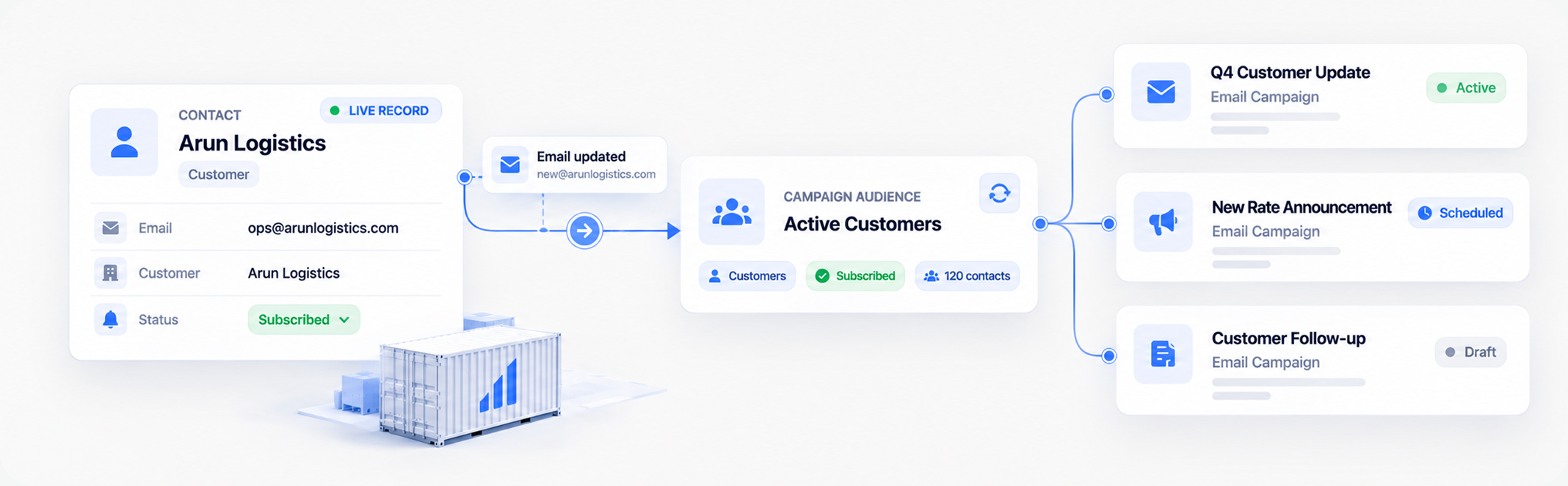
Shipthis builds campaign audiences directly from the contacts you already manage. Select customers, leads, vendors or any contact list, and use that audience for your next campaign without creating another copy of the data. Contact details and subscription preferences remain tied to the underlying record, so the audience stays aligned as your database changes, new contacts can be included, updated email addresses carry through, and unsubscribed contacts don't become forgotten entries in an old export.

.avif)
Build Mailing Lists Around the Business You Want to Reach
Create reusable audiences for trade lanes, customer segments, services, products, regions or any other grouping that matters to your campaigns.
Mailing Lists turn your contact data into reusable campaign audiences, customers on a trade lane, prospects for a service, or any segment you communicate with regularly. A list is reused across campaigns without rebuilding it each time, so rate updates, promotions and announcements can each target the right list. As contacts change, mailing lists stay connected to the same source data, no separate database to maintain.
.png)
.png)
From Audience to Send, With Every Step Under Control
Build the audience, create the message, review exactly who will receive it, then send or schedule, all within one connected workflow.
Shipthis brings the entire campaign workflow into one place. Start with your contacts and Mailing Lists, define the campaign and sender, then create the email from a template or from scratch. Before anything goes out, Review gives you a final look at the audience and the email itself, so you know exactly what you're sending and to whom. Send immediately or schedule for later, then track performance.
Unsubscribes Are Blocked. Duplicates Are Removed. Automatically
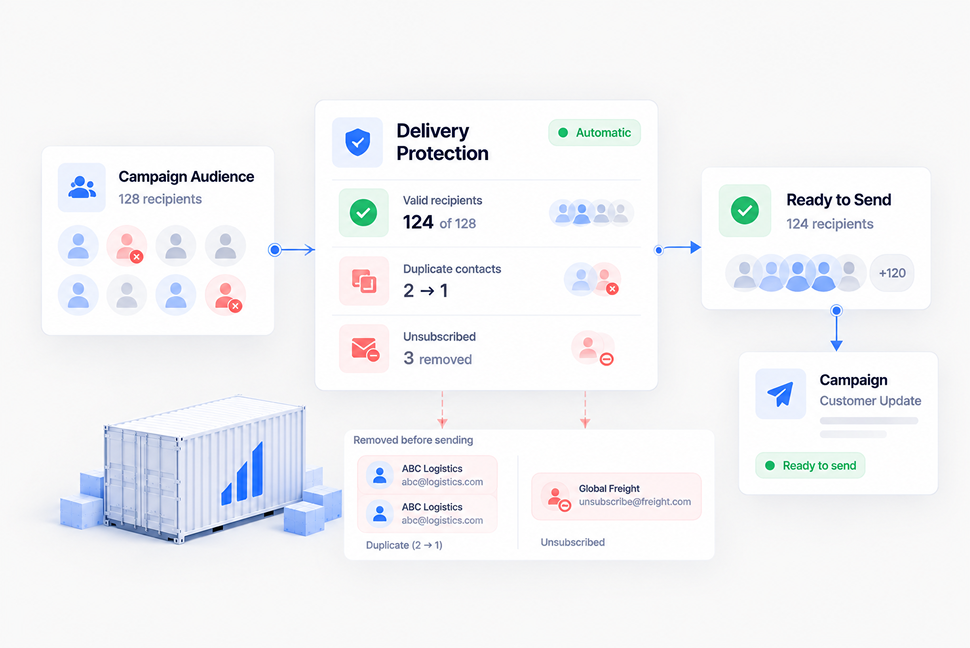
Shipthis enforces real delivery guardrails by default, not optional settings someone has to remember to turn on.
Shipthis validates the audience before delivery, so unsubscribed contacts are blocked, duplicates across lists are removed by email, and exclude lists take priority even over an included audience. CC and BCC recipients are checked the same way, so nobody gets multiple copies. Scheduled campaigns need a valid future time, queued campaigns lock once scheduled, and completed campaigns can't be altered.
.png)
Campaign Templates, Create Once. Reuse Everywhere. Keep Replies in the Conversation.
Build reusable campaign templates for consistent outreach, then route replies back into Shipthis so responses stay connected to the team running the campaign.
Create a campaign template once and reuse it for what you send regularly, rate updates, newsletters, promotions, announcements or event follow-ups, so every campaign starts from a consistent baseline. When recipients reply, connect a shared inbox and the conversation comes straight back into Shipthis instead of leaving the workflow. Need to run it again? Duplicate the campaign and go from there.
Not a Marketing Tool Bolted On, Campaigns Built on the System of Record
Audience, campaign, engagement and replies stay connected to the same customer, lead and commercial data your team already works with.
.png)
Shipthis brings campaign execution into the same system where your business relationships already live. Build audiences from real contacts, send targeted campaigns, route replies back to your team, and measure what happened. A rate update reaches the right customers, a trade-lane offer targets the right prospects, and every reply comes back to the team that owns the relationship.
Campaigns Come Ready to Use, No Setup Project Required
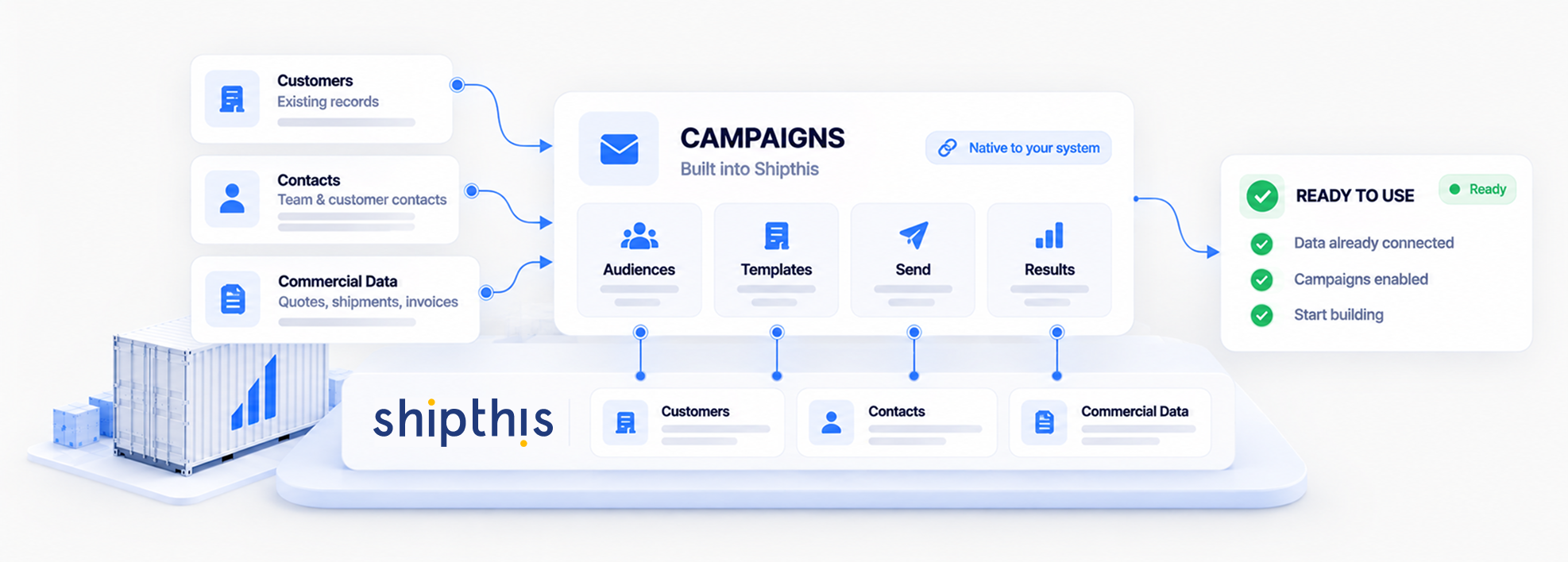
Campaigns works out of the box with the data already in Shipthis. Your contacts are already there, Mailing Lists can be built around the audiences you want to reach, and campaign performance is available as soon as you start sending. Connect a shared inbox if you want replies routed back into Shipthis, then create your first list and start building. No separate marketing database, no new system to learn, no implementation project standing between you and your first send.


Bring Your Actual Contact List. We'll Show You the Campaign It's Already Ready For.
The fastest way to evaluate this is against the customers and leads already in your system.
Book a demo scoped to how your team wants to run outreach, or start a free 30-day trial to see the Address Book and campaign workflow yourself.

Book a demo or start your 30-day free trial — and talk to a real freight specialist, not a sales script.


Campaign & Communication
Questions, Answered.
Campaigns is enabled per organisation. Where it's switched on, it appears either as its own Campaign (Beta) section or as a menu inside Sales CRM, depending on how your organisation surfaces it.
The Address Book is generated from your Customers, Vendors, and Sales CRM Leads. Contacts can't be added directly to the address book, correct or add them on the source record instead.
Unsubscribed contacts can't receive campaigns. An immediate send is blocked outright if one is included, and a scheduled send drops them automatically when it runs.
Estimated recipients are capped at 2,000 per organisation per month, and every send also draws on your organisation's daily email quota.
No, sent campaigns are locked. Duplicate the campaign to run a follow-up instead.
Only if a shared inbox is connected as the reply address, see Conversations & Email for that setup.