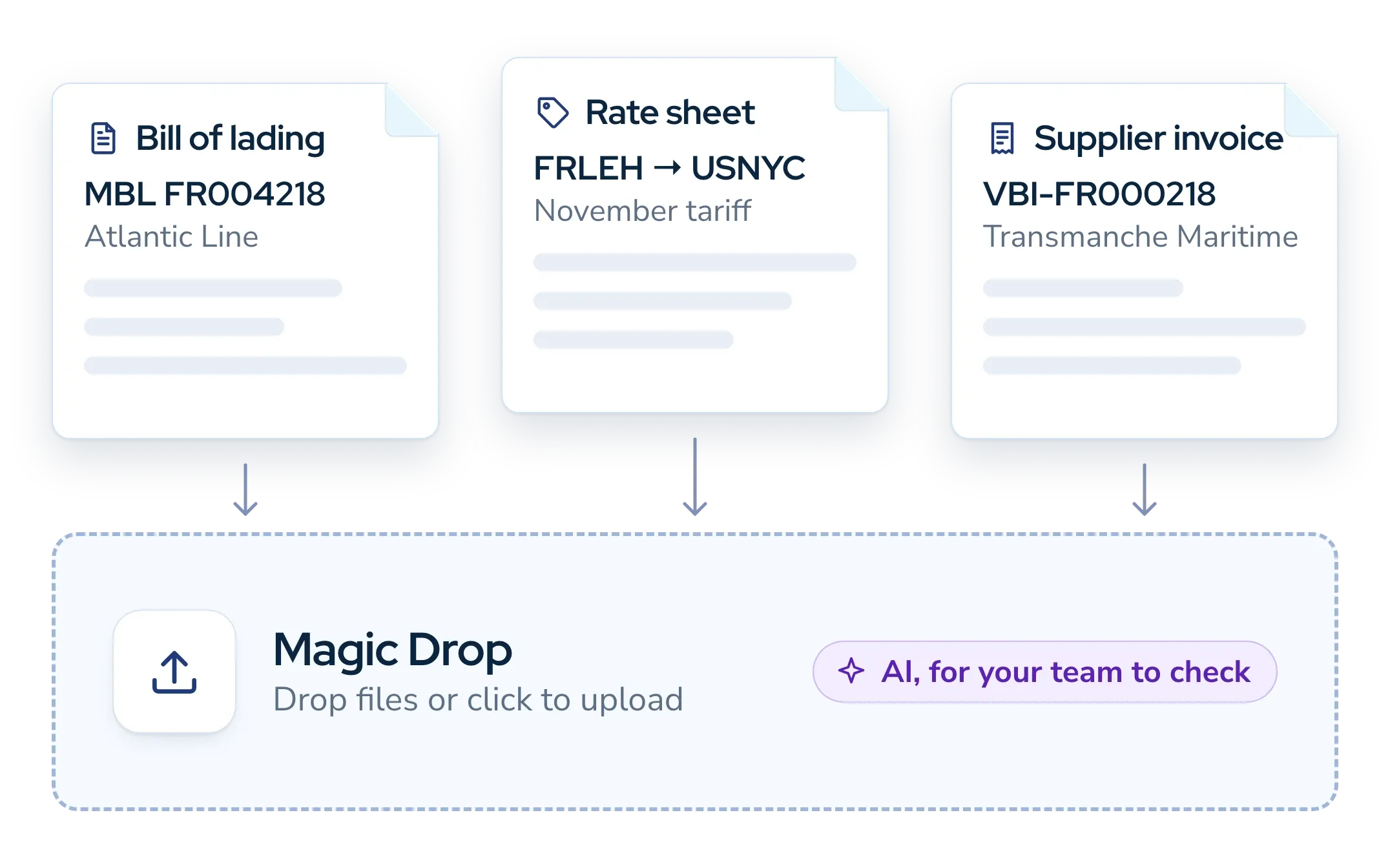

AI That Reads Your Freight Paperwork. Your Team Makes the Call.
Shipthis AI reads freight documents, emails, rate sheets and supplier invoices, and prepares the shipments, quotation requests and bills that follow from them. Your team checks what it proposes, and your organisation decides how much each AI agent may do on its own.
You Decide How Far Each Agent Goes
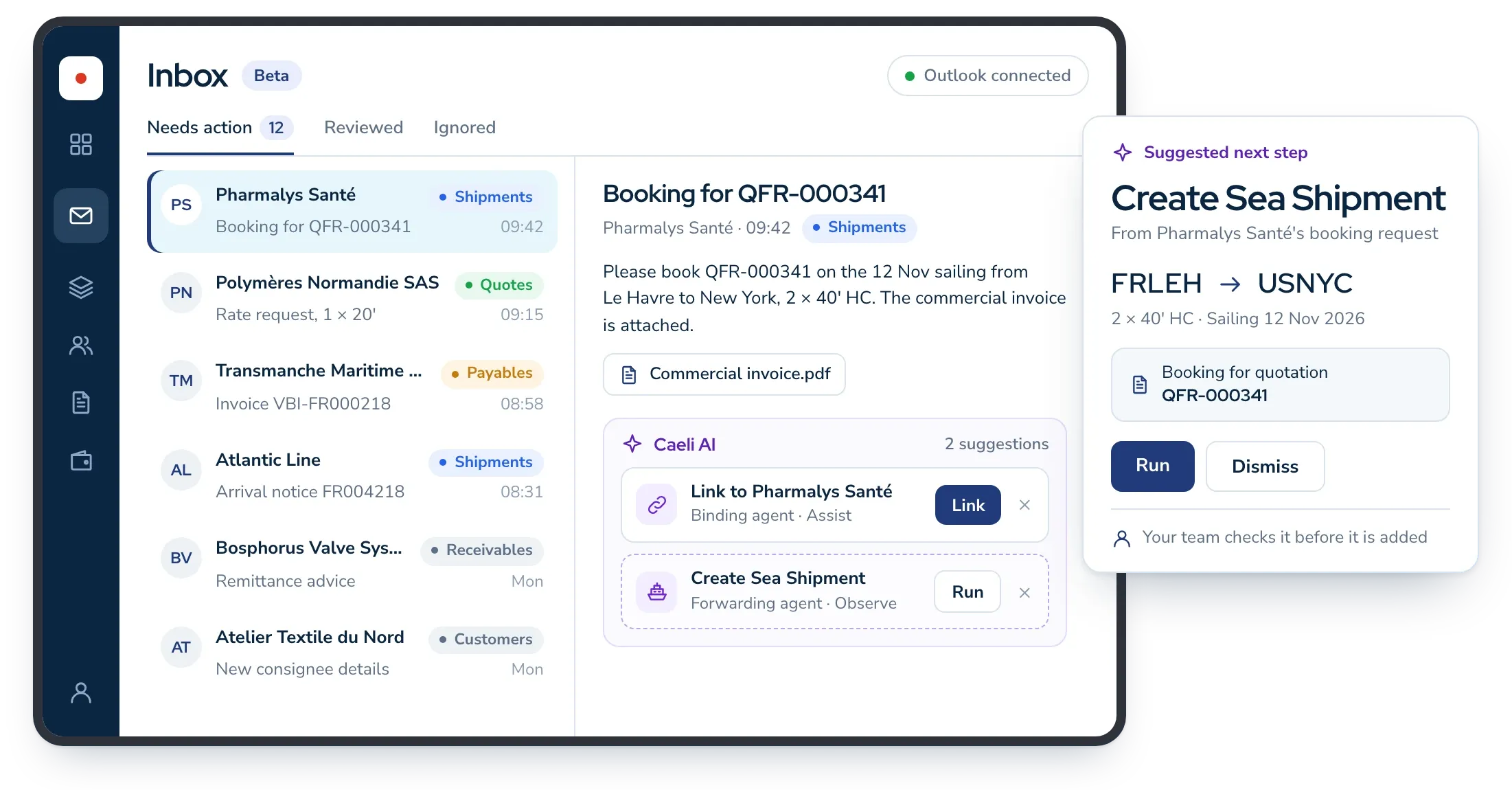
In Inbox (Beta), agents read operational email and propose the next step: link it to a shipment, customer or vendor, prepare a shipment from a booking or a quotation request from an enquiry, or log a supplier invoice. An administrator sets each agent to one of these levels, or to Silent, which switches it off.
Suggests

Prepares
Acts alone

Documents and Email, Turned Into Records
Shipthis reads what arrives and fills in the quotation request, shipment or supplier bill it belongs to, so your team checks instead of typing.
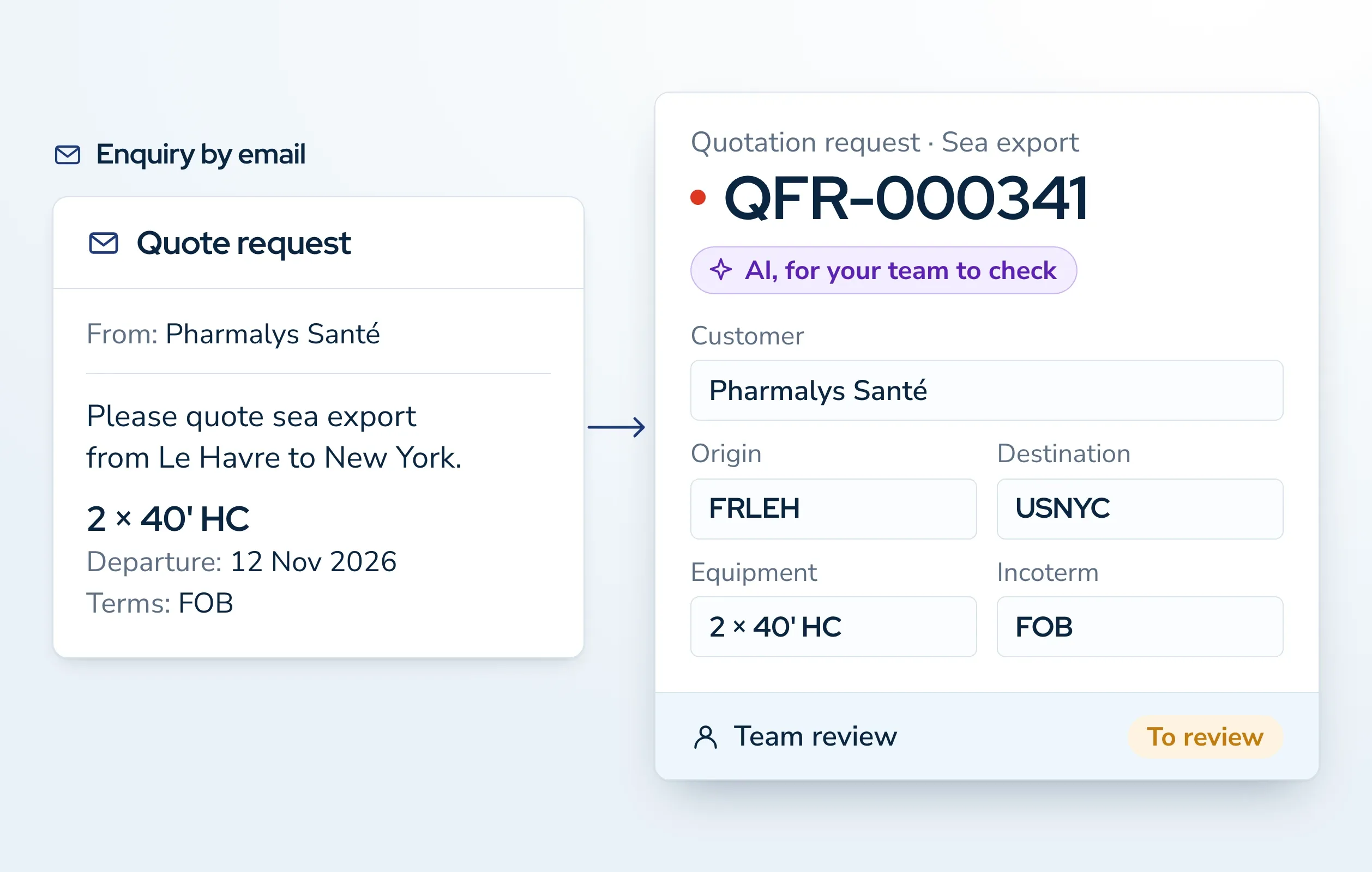
Enquiries Become Quotation Requests
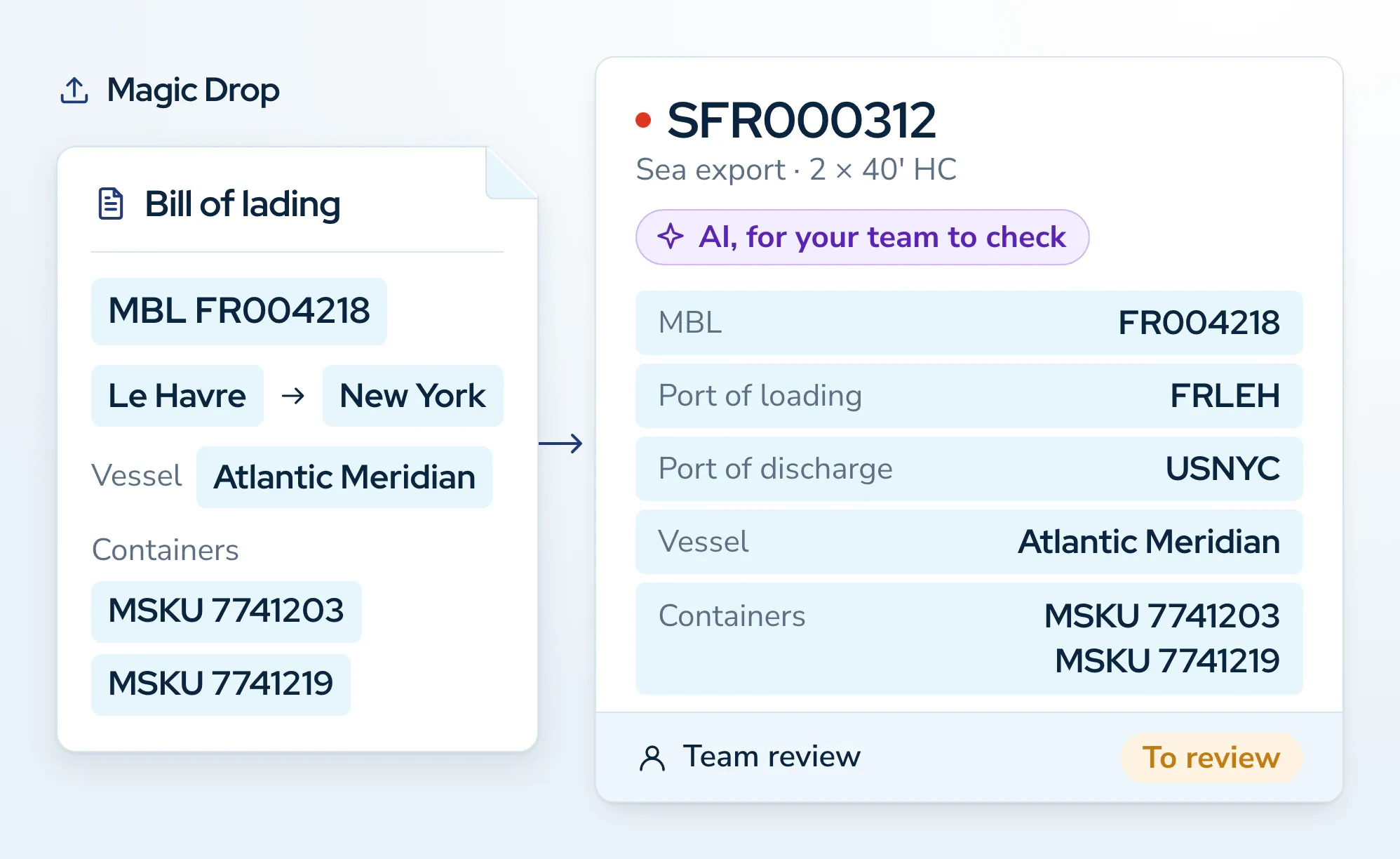
Bills of Lading Become Shipments
Drop a bill of lading, booking confirmation or other shipment document into Magic Drop. It reads the document, typically in 5 to 15 seconds, and fills the shipment's fields for your team to check before the record is added. Mappings you save are applied to the next document from the same sender.
Supplier Invoices Matched to the Job
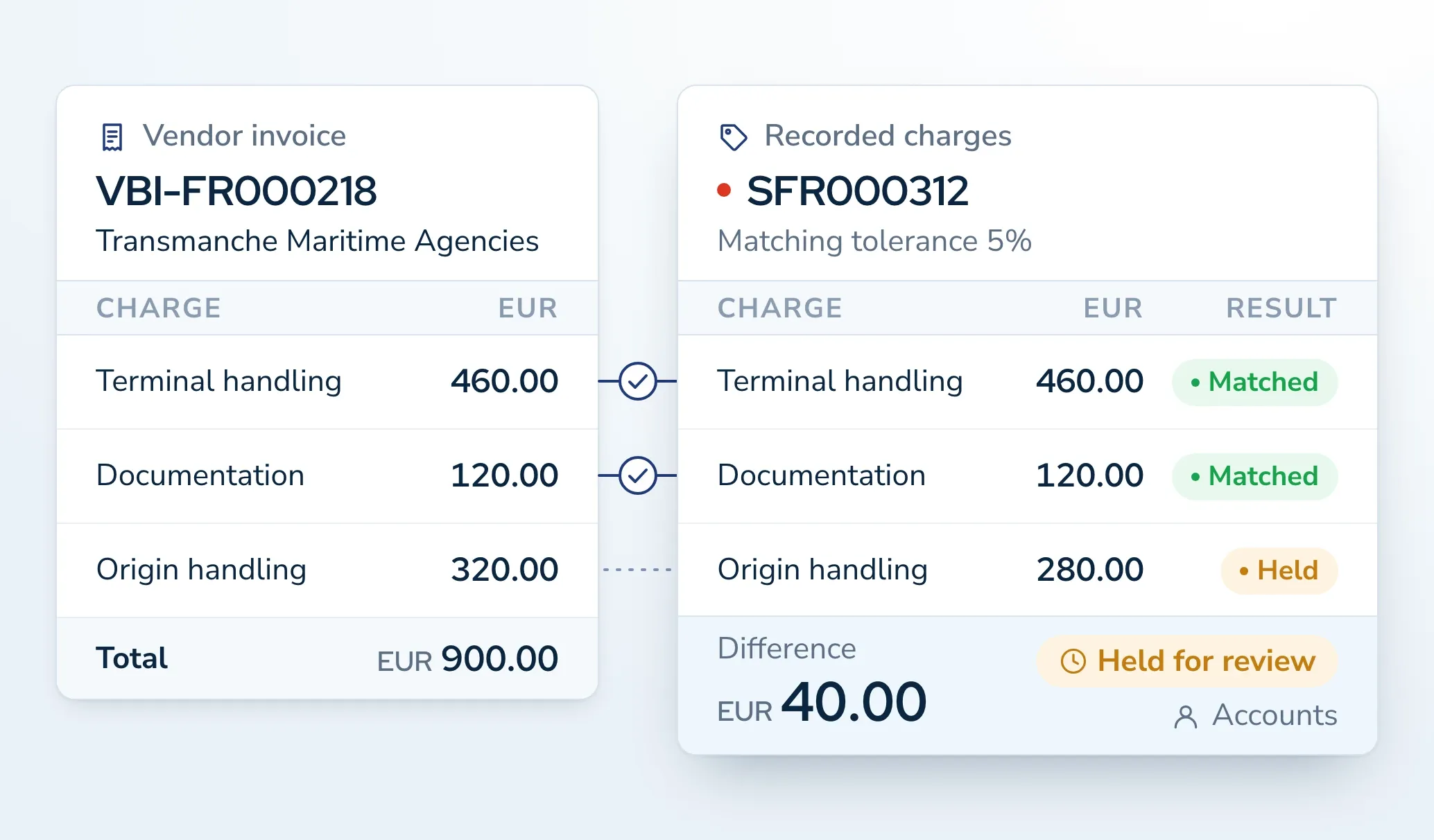
Shipthis reads a supplier's invoice, finds the vendor and the job from its references, and matches each line to the charges already recorded. An invoice that matches within your tolerance can be approved automatically; anything else is held with the reason. You can set every invoice to wait for a person instead.
Carrier Rate Sheets Become Rate Cards You Can Quote From
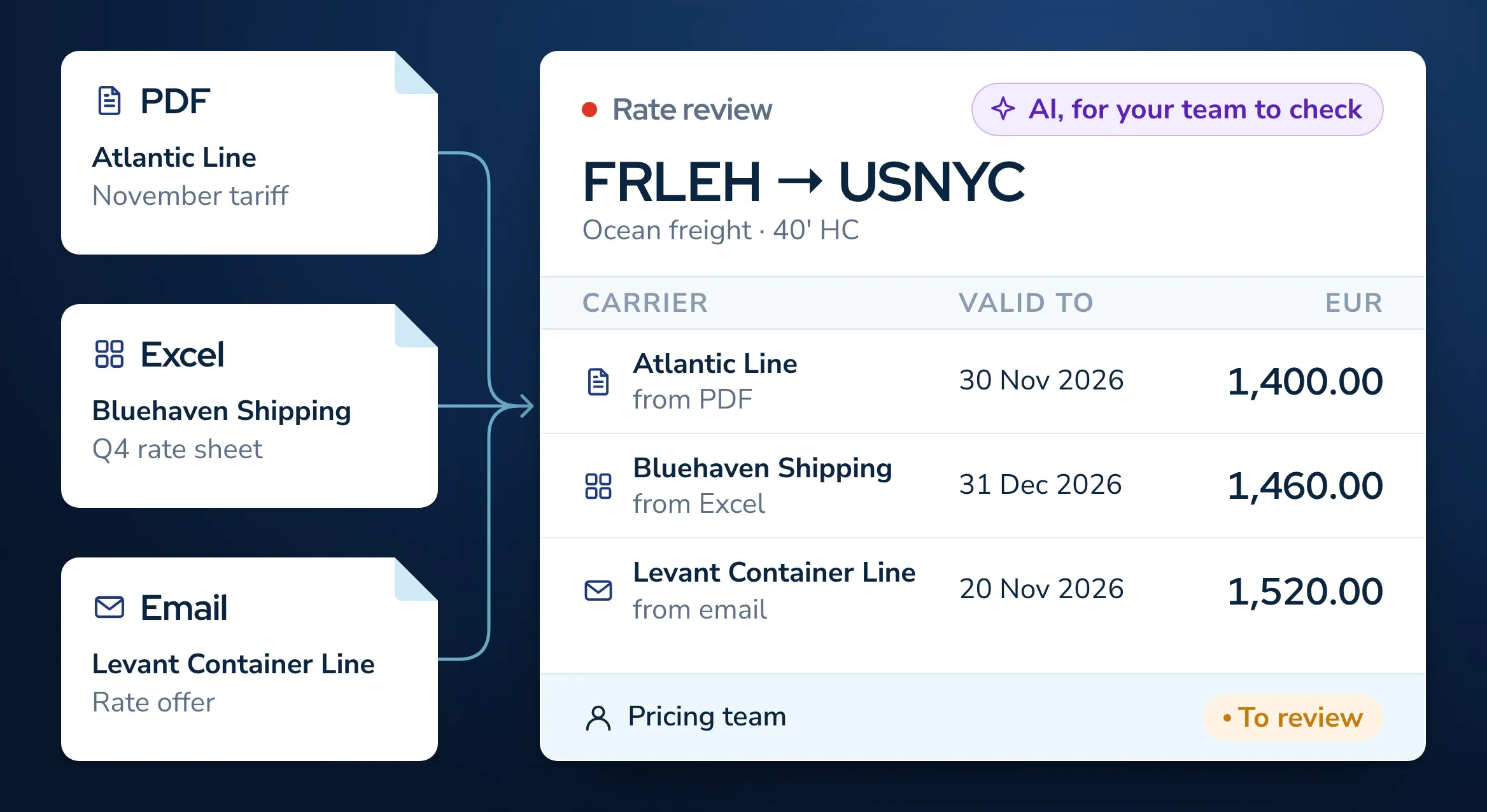
Upload a carrier's rate sheet, or have it emailed to your parser address, and Shipthis reads the port pairs, charges and surcharges into rows. Your pricing team reviews the rows, places anything left unmatched and generates the rate card, which is ready to quote from as soon as it is saved.

Quote With Your Customer's History in View
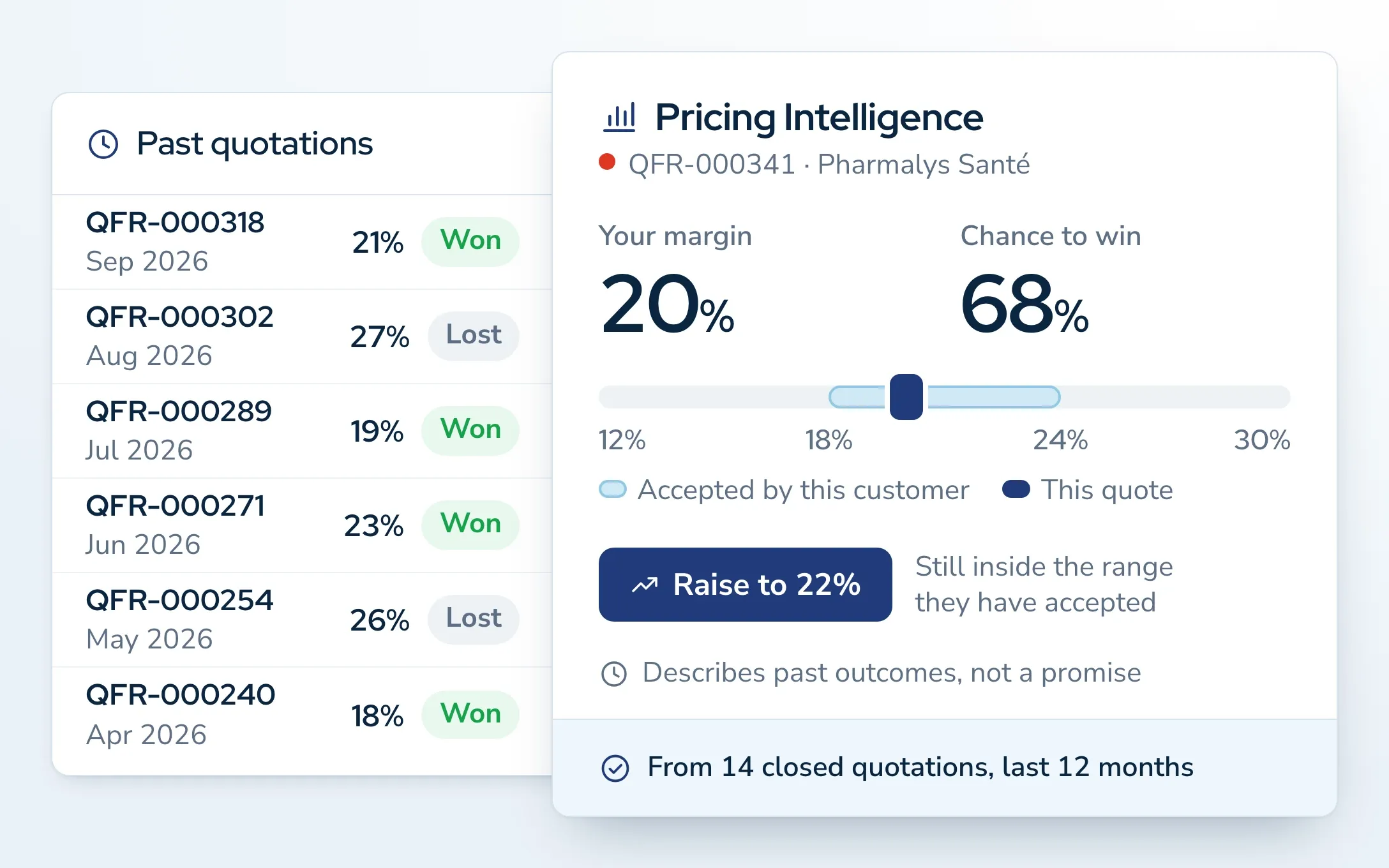
On a quotation, Pricing Intelligence shows where the margin you are about to quote sits against what this customer has accepted before, and the chance to win based on their past quotations. It works from your own closed quotations of the last 12 months, says so when there is too little history, and changes the quote only when someone clicks to raise the margin.
Built from your own quotations, not market data
Shown to your team, never to the customer
Ask Your Records a Question
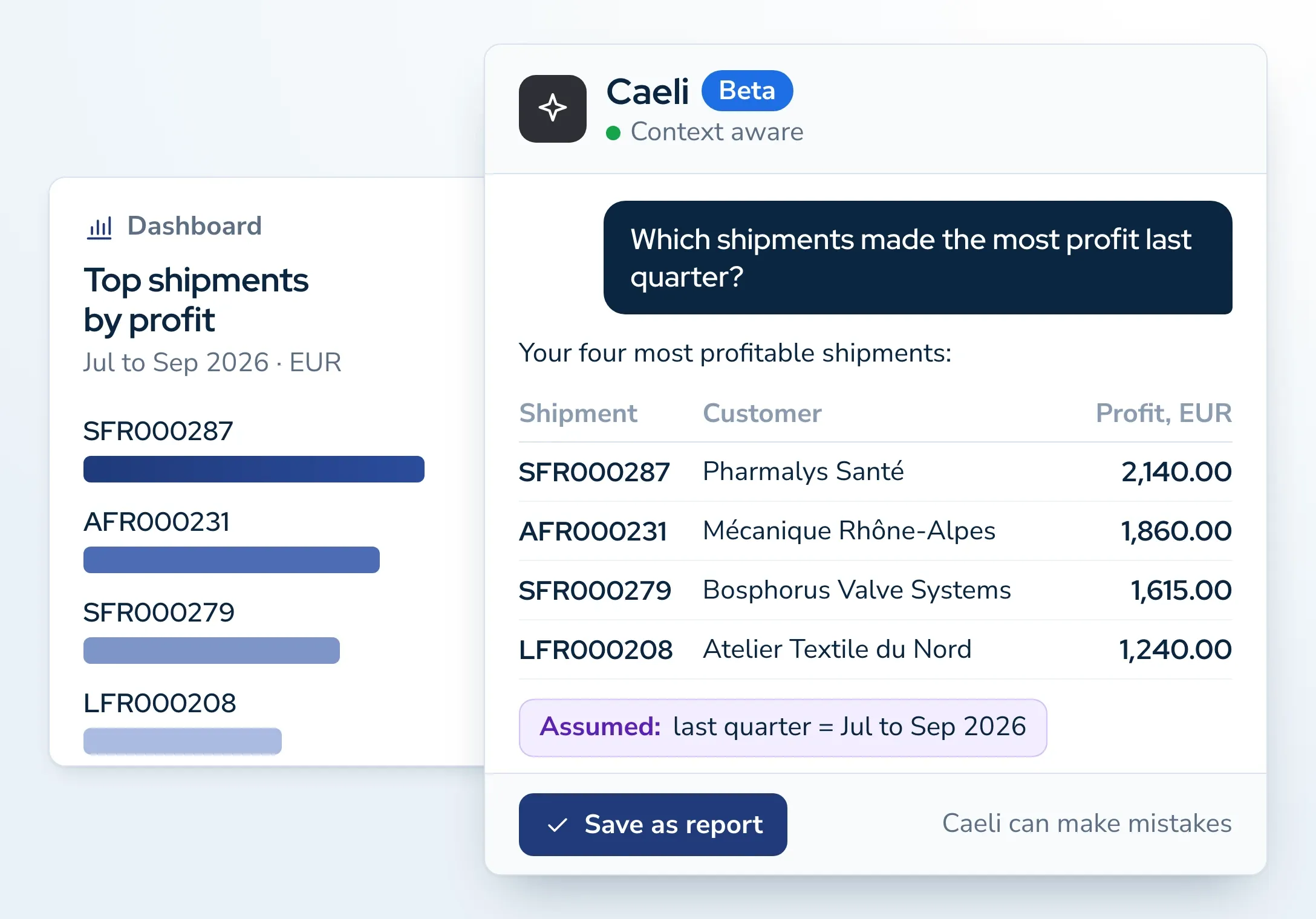
Open Caeli from any screen and ask in plain English, such as which shipments made the most profit last quarter. It answers from your organisation's own records and tells you what it assumed. Refine the answer with follow-up questions, then save it as a table, chart or dashboard figure that stays current.
Shows each person only what their permissions already allow
Asks which one you meant when a name matches more than one record
Fills in a form for you to save, and changes records only if an administrator allows it
More AI Across Shipthis
Smaller tools that take typing off your team's day, each working on the records you already keep.
Shipthis in Claude and ChatGPT
Once an administrator allows it, each person can connect their own Claude or ChatGPT and ask about shipments, invoices and customers there, seeing only what their Shipthis login allows.
Shipthis for Outlook (Beta)
From Outlook, link an email and its attachments to the right shipment, or send it to Shipthis as a quotation, shipment or supplier invoice entry to review.
AI Compose
When you set up a workflow email, AI Compose drafts the subject and body with the right shipment fields in place. In Inbox (Beta), it drafts replies for you to edit and send.
Bank Statement AI
Upload a statement as CSV, Excel or PDF and Shipthis works out which column is the date, description and amount. You check the mapping and totals before anything is imported.
Customs Declarations From Invoices
With the South African customs connection, drop the commercial invoices and Shipthis fills the goods lines and suggests tariff codes for you to confirm. Nothing is filed until you submit.
Spreadsheet and PDF Imports
When you import a spreadsheet, Shipthis suggests which column goes to which field, and it can pull rows out of a PDF for you to review before anything is imported.
Updates From Email Threads
In Inbox (Beta), on a thread linked to a shipment, Extract lists the new dates and references it found and shows the old and new values before you apply them.
Forecasts, Generated With AI
In Forecast, Shipthis can propose growth rates from your ledger history and the current market outlook, with the sources it used. You adjust the rates and save the revision.
How Shipthis AI Handles Your Data
Shipthis AI works inside the same access rules as the rest of the system, and your organisation sets how far it goes.

Same Permissions as Your Team
AI features work within each person's own access. Caeli and connected assistants show someone only the records they could already open.
Read-Only Until You Allow More
By default, Caeli and a connected Claude or ChatGPT only read. An administrator decides whether they may make the changes people ask for.
Limits You Set
Choose each inbox agent's level, the matching tolerance for supplier invoices, a maximum amount, or a checker for every bill.
Undo for Automatic Approvals
When the Finance agent approves a matching supplier invoice, your team sees a notice with Undo, available for 24 hours unless a payment exists.
Not Used to Train Shared Models
Shipthis does not use your data to train general-purpose or shared AI models, and its AI providers are engaged on terms that prohibit training on it.
Providers Named in Our Privacy Policy
Shipthis chooses the AI provider for each feature. The providers that process content sent to AI features are listed in our privacy policy.



Frequently Asked Questions
Straight answers about what Shipthis AI does on its own, what your team checks, and how your data is handled.
Mostly it prepares and proposes, and a person confirms. Magic Drop fills fields for your team to check, inbox agents suggest the next step, and Caeli only reads by default. The exception is supplier invoices. By default, an invoice that matches the job's recorded charges within your tolerance and passes the finance checks is approved automatically. You can make every invoice wait for a person instead.
Binding suggests which shipment, customer or vendor an email belongs to. Forwarding prepares a shipment from a booking email, Pricing a quotation request from an enquiry, and Sales a customer or lead. Finance logs supplier invoices, and Receivables, part of Receivables Insights, drafts a chase reply on an overdue account for a collector to approve. No agent sends email.
No. Inbox (Beta) is being released gradually, and an administrator turns the agents on. Each agent then starts at its default level, which you can change. Binding starts at Assist, Forwarding, Pricing and Sales at Observe, and Finance at Auto. Forwarding, Pricing and Sales cannot be set to Auto, so these agents never create a shipment or quotation request without a person.
Shipment documents such as bills of lading and booking confirmations, supplier invoices, purchase orders and freight rate sheets, on the record types where Magic Drop is set up. Text-based PDFs read most reliably. Reading typically takes 5 to 15 seconds, and names it cannot match to your records are left for your team to choose.
It uses no language model. Pricing Intelligence is statistics on your own quotation history. It compares the margin you are about to quote with this customer's closed quotations from the last 12 months, shows the chance to win from that history, and says so when there is too little history to go on.
Yes. Caeli (Beta) is the assistant your employees can open from any screen. Ask in plain English and it answers from your organisation's records, within the asker's permissions, and tells you what it assumed. It can make mistakes, so check important figures.
Yes, once an administrator allows AI assistant connections. Each employee connects their own Claude or ChatGPT from the Home dashboard and signs in with their Shipthis login, so the assistant sees only what they can see. It reads by default; making changes needs a second setting. ChatGPT needs Developer mode on a paid plan.
No. Shipthis does not use your data to train general-purpose or shared AI models. The AI providers that process content for its AI features are listed in our privacy policy and are engaged on terms that prohibit them from training their models on it.
See Shipthis AI on Your Own Paperwork
Book a demo and we will walk through Magic Drop, the inbox agents and Caeli on documents and emails like the ones your team handles every day.