
Recognise Revenue at the Point in the Lifecycle You Choose
Anchor recognition to the customer invoice month, the exact invoice date, a transaction date you set on the shipment, or the first billing event on a multi-invoice job. Whichever you choose, the accrual engine creates, reverses and recomputes the entries needed to bridge every timing gap. Each one is posted to a named accrual account in the ledger, referencing the charge line and shipment that produced it.
Four recognition bases. You pick the one your auditors expect.




Under accrual-basis accounting, an expense belongs in the period of the revenue it produced, so when the documents land in different months, something has to bridge the gap.
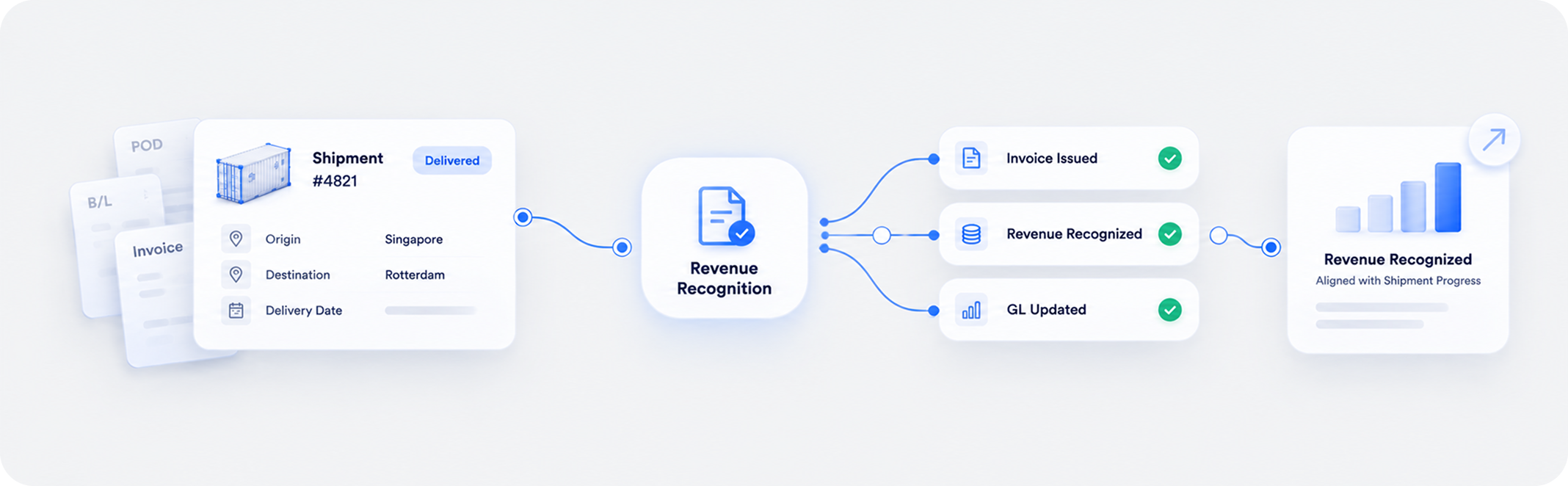
A shipment departs in January and generates a vendor bill in January, but isn’t invoiced to the customer until February. Left alone, January carries a cost with no revenue and February carries revenue with no cost. Both months are wrong, and the shipment’s real margin appears in neither. Shipthis handles this with a configurable accrual engine. You set the anchor, the point in the lifecycle where this shipment’s financials belong, and the engine creates the accrual or deferral entries that move revenue and cost into that period, recomputing them automatically whenever a charge line, invoice or cost changes.


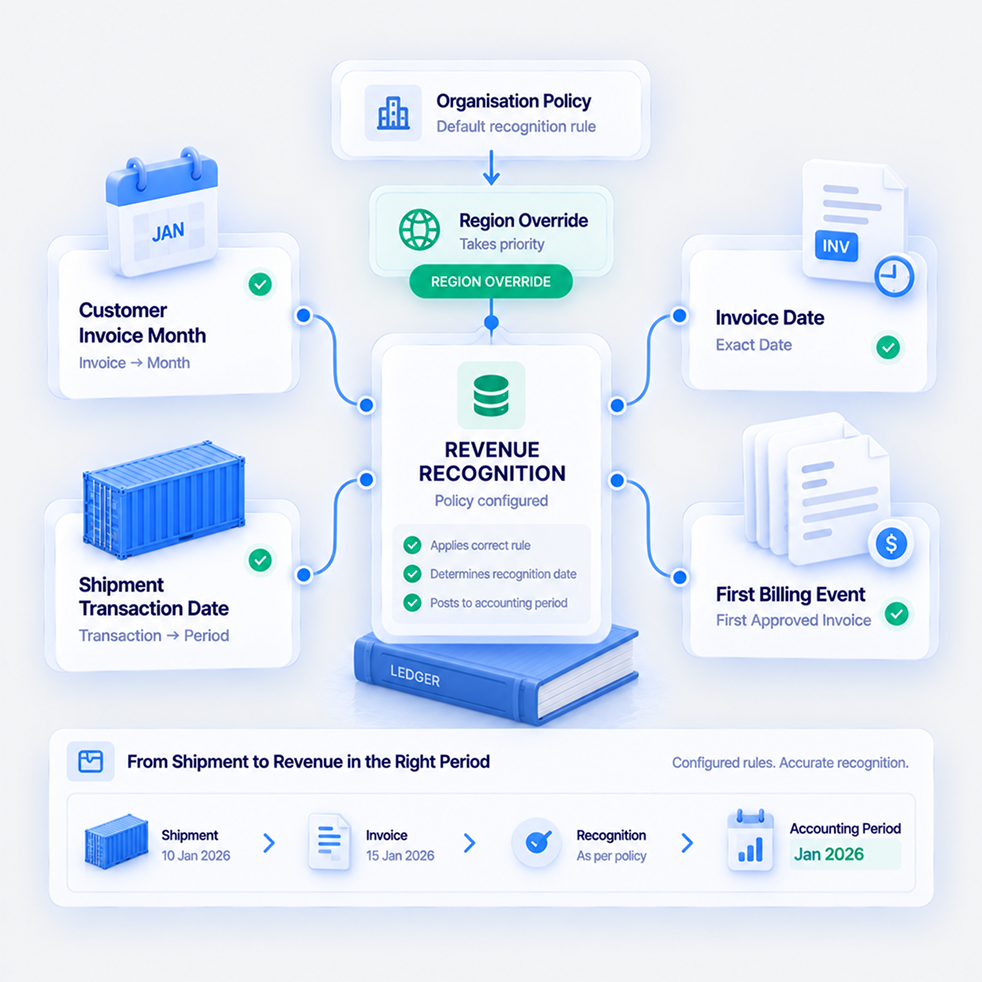
Customer Invoice Month, Invoice Date, Shipment Transaction Date, or First Billing Event
Four configurable anchors, set for the organisation and overridable per region, because two finance teams in one group can legitimately follow different recognition policies.
Customer Invoice Month anchors each charge line to the month of the approved invoice it’s linked to, resolved per charge line, so on a two-invoice shipment, charges follow their own invoice’s month. Customer Invoice Date does the same on exact dates rather than month-year, for organisations closing books daily or weekly, or where regulation demands date-level matching. Shipment Transaction Month uses a dedicated transaction date on the shipment itself, so the job’s entire financials land in the period you nominate regardless of when documents are processed. First Approved Customer Invoice Month anchors every charge on the shipment to the earliest approved invoice date, pulling the whole job’s P&L into the month it was first billed.
Each region can carry its own setting, and the region setting takes priority over the organisation’s.
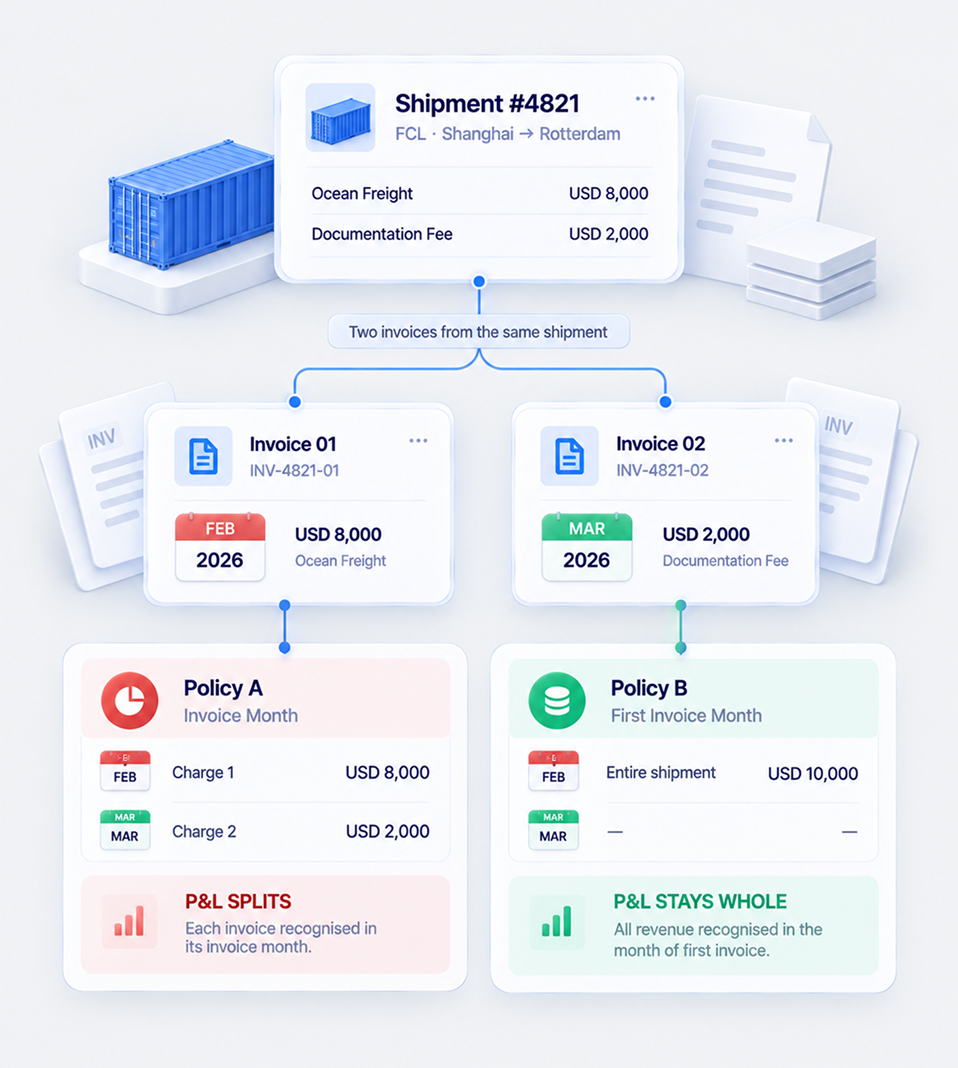
On a Two-Invoice Shipment, Does the P&L Split or Stay Whole?
Anchor per charge line and later billing lands in later months. Anchor per shipment and the whole job’s P&L is pulled into the month it was first billed. Both are defensible. The point is that you choose.
Take a shipment with two cost lines: one linked to an invoice dated in February, another to an invoice dated in March. Under Customer Invoice Month, each charge follows its own invoice, so the cost splits across February and March. Under First Approved Customer Invoice Month, both anchor to February, and the entire job’s cost lands there.
Neither is more correct in the abstract. It depends on whether your policy treats each invoice as its own event or the first billing as setting the period for the whole job. When an invoice is approved, edited or voided, the system re-evaluates the shipment’s charge lines, because the earliest approved invoice date may have changed.
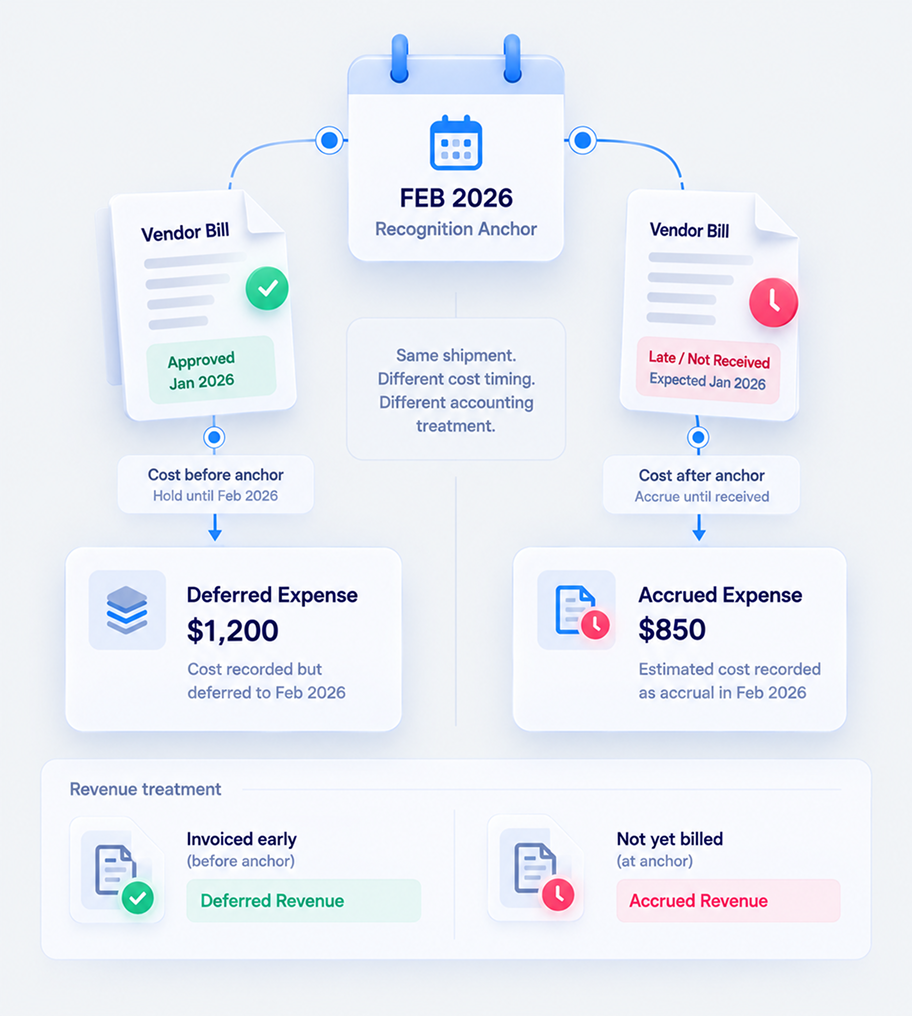
Cost Early, It Defers. Cost Late or Missing, It Accrues.
The engine picks the account from the timing itself: deferred expense when the cost arrived before the anchor period, accrued expense when it arrives after or hasn’t arrived at all.
A cost approved before the anchor period posts to Deferred Expense, holding recognition back until the anchor. A cost approved after the anchor, or not yet approved at all, posts to Accrued Expense, using the expected amount from the charge line until the real document arrives.
On the revenue side, the same logic applies in the non-invoice trigger modes: invoiced early goes to Deferred Revenue, not yet billed goes to Accrued Revenue. In the two invoice-based modes, revenue-side accruals are skipped entirely, because the invoice itself is the revenue recognition event. Nobody makes that call manually. The timing decides.
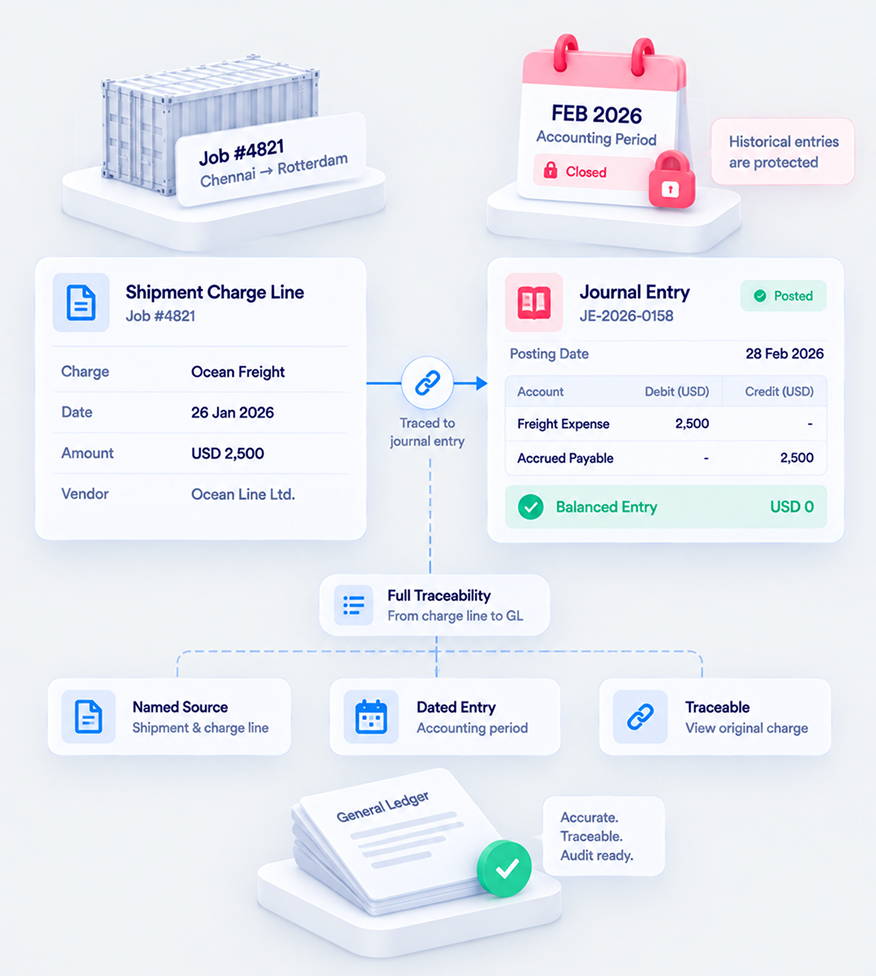
Every Bridging Entry, Named, Dated, and Traceable to Its Charge Line
Accrual entries post as journal entries to named accounts: Accrued Expense, Deferred Expense, Accrued Revenue and Deferred Revenue. Each carries a description referencing the charge line and shipment behind it.
In the General Ledger report, every accrual and deferral appears as a journal entry against its named account, described with the charge line and shipment that caused it. In the P&L, revenue and cost show matched in the anchor period regardless of when the documents were approved. In the Trial Balance, the accrual accounts carry balances representing genuine timing differences, and those balances should reduce as actual costs arrive.
Entries protected by a closed accounting period aren’t rewritten. If a change to a charge line would disturb an entry in a locked period, the change is blocked rather than quietly altering history.
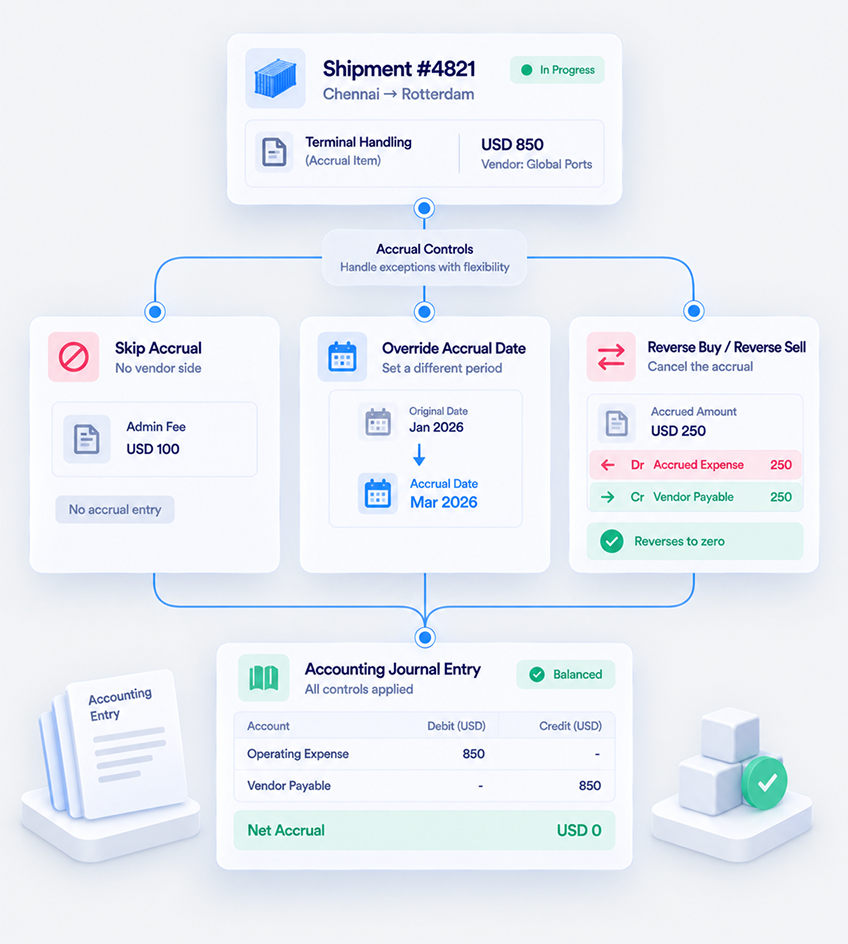
Some Charges Are Exceptions. Three Controls Cover Them.
Skip Accrual for charges with no vendor side, Override Accrual Date when one charge belongs in a different period, and Reverse Buy or Reverse Sell when an accrued side will never materialise.
A documentation fee with no vendor cost doesn’t need an accrual. Set Skip Accrual on the Charge Master item and generated charges inherit it. A charge that genuinely belongs in a different period than the trigger assigns can carry its own accrual date.
And when an accrued cost is never going to be billed, Reverse Buy writes off that side on its own reversal date: an offsetting entry posts, the side drops to zero in provisional P&L, and it’s settled, no longer blocking closure and no longer billable. Reverse Sell does the same on the revenue side, where a revenue-accruing trigger is in use.



Set the Policy. Don’t Write the Journals.
Four recognition bases, region-level overrides, automatic accrual and deferral entries, and a ledger trail you can hand an auditor.
Recognition timing is usually one of two things: fixed by the software and therefore not really your policy, or configurable but manual, which means someone in finance writes bridging journals every close.
Shipthis separates the two properly. You set the anchor per organisation or per region, and the engine builds, reverses and recomputes the entries as charge lines, invoices and costs change, posting each one to a named account with the charge line and shipment on it. The policy stays yours. The journals stop being anyone’s job.
Two Things Worth Deciding Before You Go Live
A dedicated implementation team walks your finance team through both decisions before go-live, so recognition follows your policy from the first shipment.
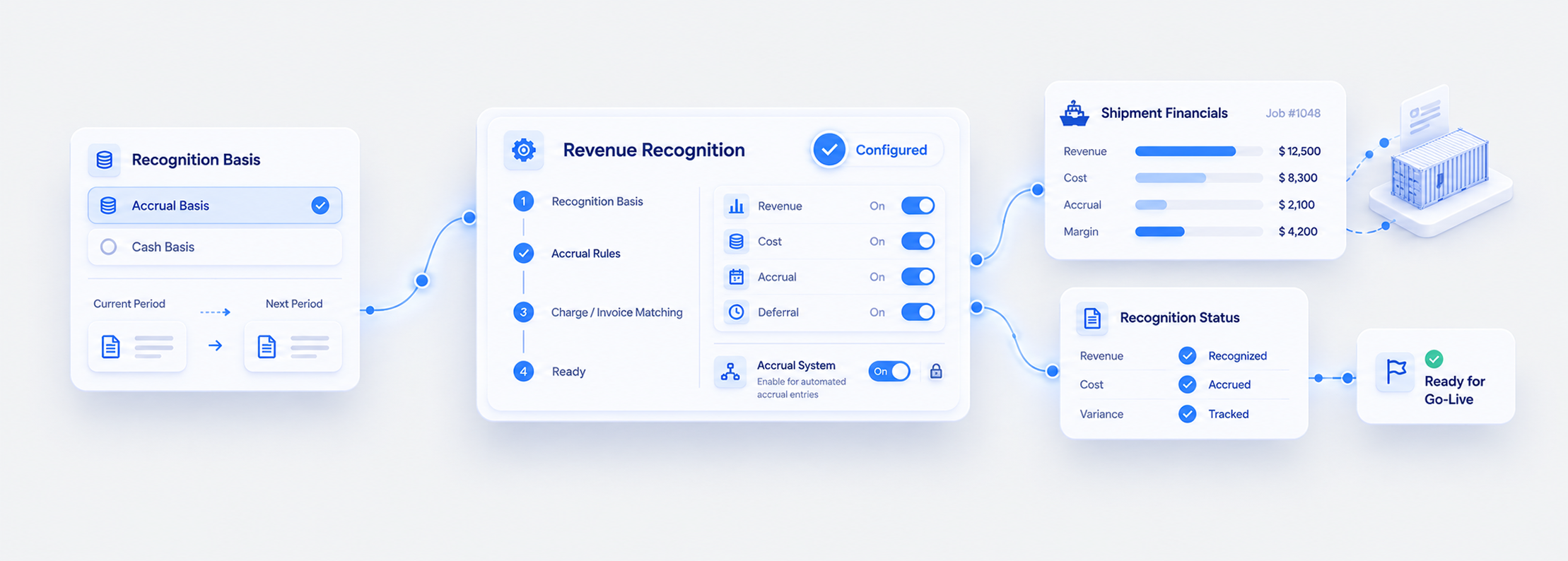
Choose the recognition basis with your finance team before go-live. Changing it later works, but saving the new preference doesn’t bulk-recompute every open shipment. The new basis applies as affected charges, invoices, costs and shipments are subsequently processed. If existing open jobs need to move too, that’s a controlled reprocessing exercise worth planning rather than discovering.
The accrual system can also be switched off entirely, and that action is irreversible from the settings page. Existing entries remain in the ledger, but no new ones are created and revenue and cost recognise wherever their documents happen to be approved. Implementation walks through both decisions with you, alongside migrating your chart of accounts and accrual account mapping.

Tell Us Your Recognition Policy. We’ll Show You Which Mode Fits.
Bring how your auditors expect revenue and cost matched, and we’ll walk through the mode that delivers it, and the entries it produces.
The fastest way to judge this is against your own policy rather than a demo dataset. Prefer to explore first? A free 30-day trial gives your team hands-on access with no commitment.

Revenue Recognition Questions, Answered
No. They’re created, reversed and recomputed automatically whenever charge lines, invoices or costs are created or modified. You view them in the General Ledger under the accrual and deferral accounts.
Customer Invoice Month, Customer Invoice Date, Shipment Transaction Month, and First Approved Customer Invoice Month.
Yes. Each region can carry its own accrual trigger, and the region setting takes priority over the organisation setting.
It represents costs you expect but haven’t been billed for. It clears when the vendor bill is approved, or when finance writes the side off using Reverse Buy with a reversal date in an open period. The system doesn’t close stale accruals just because time has passed, so these accounts are worth reviewing at each close.
Usually that vendor bills aren’t arriving or aren’t being approved. It’s a useful health indicator for the AP process, worth monitoring monthly.
Yes, but saving the preference doesn’t bulk-recompute existing open shipments. The new basis applies as affected records are subsequently processed. Moving existing open jobs is a controlled exercise to plan with your finance team.
Either it’s linked to an approved invoice or cost in a locked period, or you’re in Shipment Transaction Month mode and the shipment’s transaction date sits before the transaction lock date. In that second case, customer and vendor fields can still be changed, but amounts can’t.